 French
 English

 Subsidy application at no cost
 Employee wages reimbursed
 Turnkey file by Delisoft
 In less than 10 business days

Microsoft 365
Excel, Word, PowerPoint, Outlook, Teams, SharePoint and OneDrive: work faster and collaborate better every day.

Microsoft training subsidy
Train your team on Excel, Teams, Outlook, SharePoint, Power BI and Copilot with a subsidy that lowers the cost of training.
Subsidized Microsoft 365 training lets you fund up to 85% of your team’s training on Excel, Teams, SharePoint, Power BI or Copilot, through Services Québec’s MFOR-E. Delisoft prepares your file and trains your team, anywhere in Quebec.

Microsoft software
Excel, Teams, Outlook, SharePoint, Power BI or Copilot: train your team on the Microsoft tools it uses every day and get up to 85% of your eligible training expenses subsidized. For Dynamics 365, Microsoft’s CRM, see our CRM subsidy page.
Microsoft 365
Excel, Word, PowerPoint, Outlook, Teams, SharePoint and OneDrive: work faster and collaborate better every day.


Copilot and Power BI
Microsoft’s artificial intelligence and clear dashboards to make decisions faster.
Microsoft 365 training
Microsoft 365 brings together the tools your team opens every morning. The training starts from your real tasks and teaches your team to work faster in Excel, collaborate better in Teams and Outlook, and keep its files well organized in SharePoint and OneDrive.
Ideal for SMEs that already use Microsoft 365 without making the most of it. To train your team on your CRM, see our CRM subsidy page.
Formulas, pivot tables and charts to analyze your data without errors.
Channels, conversations, shared files and efficient meetings with your team.
Manage your emails, appointments and tasks without feeling overwhelmed.
File, share and find your documents, with a single up-to-date version.




Microsoft 365 training eligible for the MFOR-E subsidy.
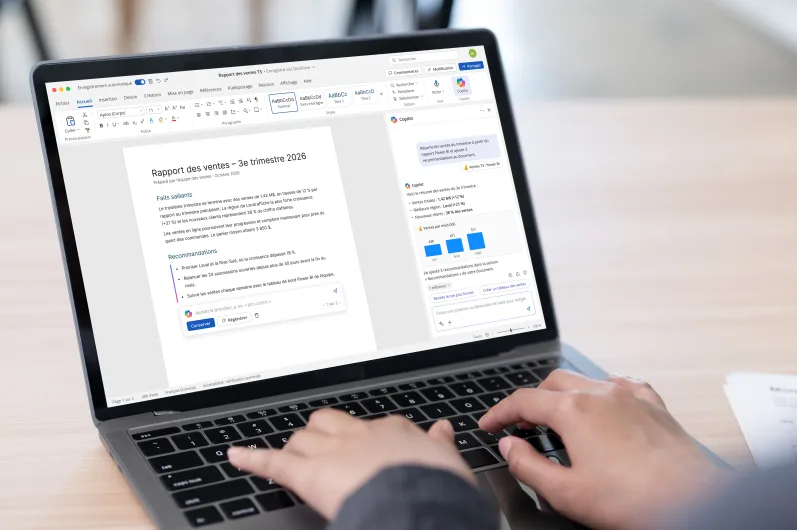
Copilot works with your Microsoft 365 access rights and permissions.
Copilot and Power BI training
Copilot is Microsoft 365’s artificial intelligence assistant, and Power BI its dashboard tool. Pierre-Luc teaches your team to write, summarize and analyze faster with Copilot, then to turn your data into clear reports with Power BI.
Ideal for businesses that want to use AI at work in a concrete, supervised way. To go further with artificial intelligence, see our Artificial intelligence subsidy page.
Write a document, summarize a long email and draft a reply in seconds.
Get a meeting summary, the decisions made and the follow-up tasks.
Connect your data and track your indicators in up-to-date dashboards.
Write good prompts, check the answers and protect sensitive information.
Sample calculation — for illustration only
Microsoft 365 and Dynamics 365 example: an SME trains 20 employees for 40 hours on Excel, Copilot and Dynamics 365, for $12,000 in training costs. The project is approved at an 85% subsidy rate, and the participants’ wages are recognized.
Subsidized fees
$10,200
$12,000 × 85%
Wages (cap)
$20,000
20 × 40 h × $25/h
Total eligible
$30,200
$10,200 + $20,000
Result: for $12,000 in training fees, up to $30,200 in potential support.
Source: Services Québec (MFOR program). 85% rate and $25/h wage based on our recently approved projects.
Training content
Whatever Microsoft tools your team uses, every course follows the same approach: we understand the tool, adapt it to your tasks, then use it together day to day.
Tell us which Microsoft tools your team uses: Excel, Teams, SharePoint, Power BI or Copilot. We build the training program and the subsidy file with you.
Apply nowGetting started with Microsoft 365 and its applications. Each participant learns to move from Outlook to Teams, OneDrive and SharePoint, find a file and understand where information is stored.
Formulas, pivot tables, charts and Power BI dashboards to analyze your figures and track your indicators.
Channels, conversations, meetings, emails, calendar and tasks: everyone learns to communicate and plan without wasting time.
File, share and co-edit your documents, manage access and find the right version of a file in seconds.
Use Copilot in Word, Outlook, Excel and Teams to write, summarize and analyze, with good prompts and answers that are checked.
Every concept is applied to your own files and real tasks, so the team uses Microsoft 365 the day after the training.
Passwords, two-factor authentication, secure sharing and spotting phishing to protect the company’s data.
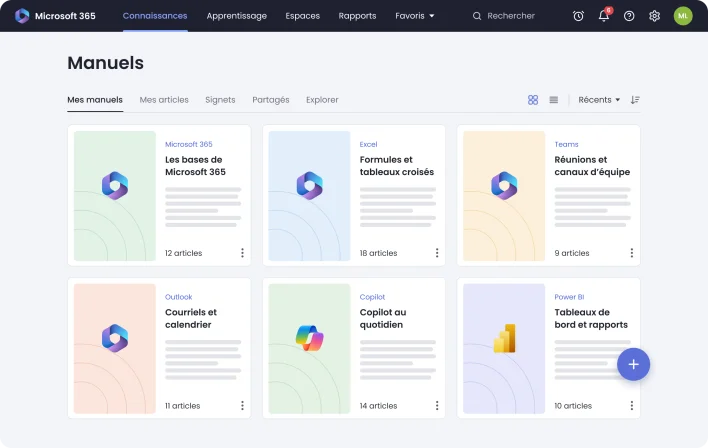
Each session becomes a clear, organized manual, tailored to your business and your processes.
Zoho Learn
While we train your team on Microsoft 365, we create a Zoho Learn manual for each course. You can come back to your training, tailored to your business, at any time.
It is also very handy when you hire in the future: your new employees can train on their own with the manuals, without starting from scratch.
Clear, step-by-step explanations tailored to your processes.
Screenshots of your own Microsoft 365 screens to find every step again.
Screen-sharing videos to review the training at any time.
Look up your training whenever you want, today or a year from now.
Eligibility
A subsidy open to Quebec businesses to develop their team’s Microsoft 365 skills.
Any Quebec business with a Quebec enterprise number (NEQ) and employees to train on Microsoft 365 can apply through Services Québec’s MFOR-E subsidy. Delisoft prepares the file and approval generally takes less than 10 business days. SMEs with 6 to 99 employees have priority. Source: Services Québec, Guide des mesures et services d’emploi, MFOR businesses component.
Apply nowYour business operates in Quebec and employs staff in the province.
A Quebec enterprise number is required to submit your application.
You have employees to train. SMEs with 6 to 99 employees have priority.
Private businesses, NPOs, cooperatives and self-employed workers can apply.
The training develops skills related to the position or to the tasks required by the employer.
The trainer must be approved by Services Québec. Delisoft’s training courses are eligible.

Recognized trainer
Pierre-Luc Delisle, founder of Delisoft, is a recognized trainer: his Microsoft 365 courses are eligible for the MFOR-E subsidy. He trains your team himself on Excel, Teams, SharePoint, Power BI and Copilot, around your tools and the way you work.
From analyzing your needs to submitting the file to Services Québec, we prepare and manage your application from A to Z.
Recognized trainer
His courses meet the MFOR-E requirements. Your project is eligible, hassle-free.
More than 25 years of expertise
Web, digital marketing and productivity tools: he teaches what he practises every day.
Results the very next day
Your team leaves with tools it masters and uses right away.
The way you work
Each course is built around your files, your meetings and your team’s actual tasks.
Benefits for your business
Your Microsoft 365 licences only pay off if your team knows how to use them.
The MFOR-E lowers the cost of training your team while speeding up the adoption of Microsoft 365 and Copilot. A well-trained team finds its files in seconds, collaborates in Teams and lets Copilot speed up repetitive tasks.
Find a file, schedule a meeting or share a document in a few clicks.
A single version of each document, available to the whole team.
Excel and Power BI to track your results and make better decisions.
Teams and Outlook to communicate and work together, even remotely.
Copilot to write, summarize and analyze faster, securely.
Up to 85% of your eligible training expenses subsidized.
Proof of success
Client testimonials and media mentions reflect our commitment to delivering web, software and digital solutions that generate real results.
Delisoft put us number one at the top of search engines with several keywords, despite the strong competition in our field. That allowed us to increase our visibility with the public. Thank you again Delisoft!
In fact, we found Delisoft by searching on Google, and Delisoft always came up first. So what we need most is SEO and online advertising, because that is what we rely on today [...]
Hello, Luc Poirier here. I have worked with Delisoft a few times in the past, and it has always gone really well. So I definitely recommend them.
Even me, an old-school guy who thought a website had to be basic, Delisoft proved to me that it could work [...]
I know Delisoft because they were the first to appear on Google during a search. Here, in the industry, it just made sense to choose a company [...]
I discovered Delisoft by searching on Google and they were number 1. Since the goal is acquiring new patients, it was obvious to go with [...]






FAQ
Find answers to your questions about eligibility, financial assistance and the steps to follow for your Microsoft 365 training.
Can’t find the answer to your question? Our team is available to advise you and guide you through your Microsoft 365 training project.
Contact an expertQu'est-ce que la subvention MFOR ? La MFOR est une subvention pour la formation de […] Read more
Subvention MFOR : qu'est-ce que c'est et comment financer la formation de votre équipe ? […] Read more
La question « Microsoft Copilot est-il inclus dans Microsoft 365 ? » revient fréquemment auprès […] Read more
La question « Est-ce que Microsoft Copilot protège la confidentialité de mes données ? » […] Read more
Quelles sont les subventions disponibles au Québec? Subventions pour entreprises au Québec : la MFOR, […] Read more
Si vous vous demandez « Comment profiter de la subvention Volet 2 maintenant qu'elle a […] Read more
















 700+ Google reviews